


Running a fashion ecommerce store involves much more than uploading products and processing orders. You need to track inventory across sizes and colours, respond to customer queries, recover abandoned carts, coordinate deliveries, manage returns, and promote new collections. As order volumes increase, handling these activities manually becomes difficult.
This is where ecommerce automation for fashion stores makes a difference. It uses connected software, integrations, and predefined workflows to manage repetitive tasks with less manual effort.
Instead of updating spreadsheets or sending every customer message individually, your systems can handle routine activities automatically.
For clothing brands in India, automation can also simplify cash-on-delivery (COD) confirmations, WhatsApp updates, inventory tracking, and return management.
The goal is not to remove human involvement from your business. It is to give your team more time to focus on customers, products, and growth.
Ecommerce automation for fashion stores reduces manual work across inventory, orders, marketing, customer support, and returns.
Automated inventory management tracks stock across product sizes and colours, helping prevent overselling and stock discrepancies.
Order processing and fulfilment workflows simplify order verification, shipping coordination, and customer notifications.
Abandoned-cart automation helps recover potential sales through timely email, SMS, and WhatsApp reminders.
WhatsApp automation supports COD confirmation, order updates, delivery notifications, and customer communication.
Automated return and exchange workflows make it easier to manage size-related issues and customer requests.
What Is Ecommerce Automation?
Ecommerce automation uses software to perform routine store activities when specific events or conditions occur. These events are called triggers, and the tasks performed in response are called actions.
For example, when a customer purchases a dress, an automated workflow can:
Record the order and update inventory for the selected size and colour.
Send an order confirmation message.
Notify the fulfilment team.
Share tracking details after dispatch.
Request a product review after delivery.
These actions can happen across connected systems without requiring someone to manage every step manually.
Automation can cover several parts of an ecommerce operation, including marketing, inventory, fulfilment, customer service, and fraud prevention. Shopify also provides workflow automation through Shopify Flow, which connects store events with actions and conditions.
7 Ecommerce Automation Workflows Every Fashion Store Needs
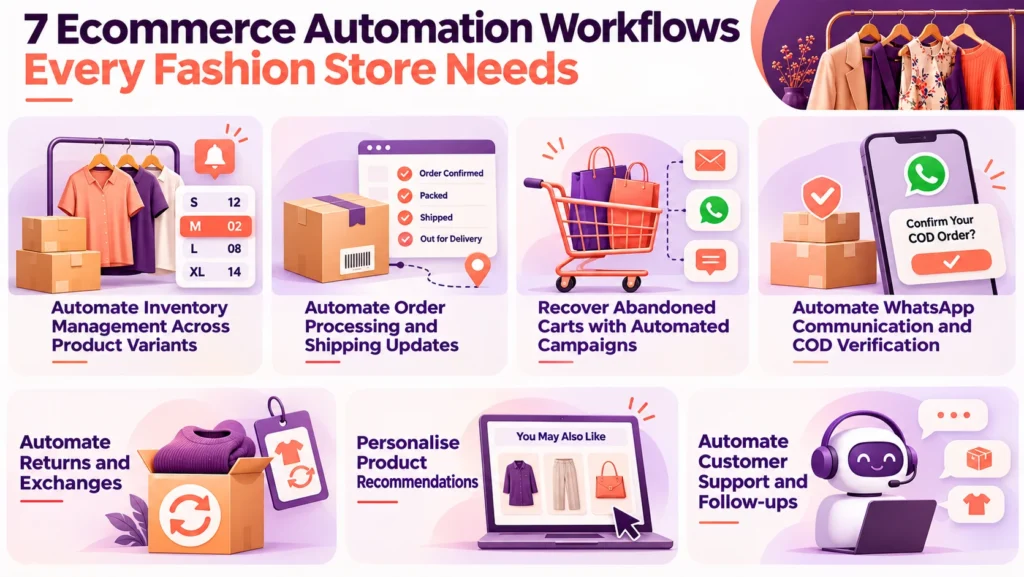
Not every task needs automation immediately. Fashion brands should prioritise workflows that reduce operational delays, prevent errors, and improve the shopping experience.
Automate Inventory Management Across Product Variants
Inventory management becomes complicated when a clothing product has several sizes and colours. A black shirt in size M and the same shirt in size XL must have separate stock records.
Inventory automation updates these records when orders are placed, cancelled, or returned. It can also notify your team when a popular variant reaches its reorder threshold.
For example, if a particular kurti has only two units remaining in size M, your system can alert the inventory manager before the product sells out.
For brands selling through multiple channels, inventory synchronisation is equally important. Connecting website, marketplace, and store inventory helps reduce overselling and inconsistent stock information.
Automate Order Processing and Shipping Updates
Manually recording orders, preparing invoices, and sharing tracking details creates unnecessary administrative work.
An automated order workflow can record customer information, generate order documentation, notify the packing team, and connect the order with a shipping partner.
Customers can then receive updates when their orders are confirmed, dispatched, or out for delivery. Your team spends less time answering routine tracking questions and can focus on exceptions such as failed payments or incorrect addresses.
Insights: About 94% of the time, users form their opinion about a website based on its design, and an average user takes only 0.05 seconds to decide how they feel about a website after landing on it.
Recover Abandoned Carts with Automated Campaigns
A shopper may add a saree or a pair of jeans to their cart but leave without completing the purchase. It could happen because of unexpected delivery charges, uncertainty about sizing, or simply getting distracted. Fashion brands can use automated email, SMS, or WhatsApp campaigns to bring these shoppers back.
For example, the first reminder can be sent a few hours after abandonment to remind customers about the products they left behind. If they still do not complete the purchase, a second message after 24 hours can share product details, customer reviews, sizing information, or return policies to address their concerns.
A later reminder can include a suitable discount or incentive to encourage checkout. However, avoid offering discounts in every message, as useful information may be enough to convert an interested shopper.
Track recovered orders and revenue to measure the actual impact of these campaigns rather than relying only on message clicks.
Automate WhatsApp Communication and COD Verification
WhatsApp can help Indian fashion brands communicate with customers throughout the buying journey. Instead of manually responding to every order enquiry, businesses can connect their ecommerce store with the WhatsApp Business Platform. Useful workflows include:
Order confirmation and payment updates.
COD order verification before dispatch.
Shipping and delivery notifications.
Abandoned-cart reminders.
Back-in-stock alerts.
Return and exchange updates.
COD verification is particularly relevant because an unconfirmed order may result in a failed delivery and return to origin (RTO). A confirmation message gives customers an opportunity to verify their purchase before dispatch.
Use approved templates where required, respect customer consent, and provide a way to reach human support.
Simplify Returns and Exchange Management
Returns are a regular part of online fashion retail. Customers may receive the wrong size, find that a garment does not fit as expected, or decide that the product does not match their requirements.
A structured return workflow can allow customers to submit requests through a self-service portal. Based on your return policy, the system can collect the order number, product, reason for return, and preferred resolution.
Your team can then review the request, approve eligible returns, and coordinate the next steps. Exchange workflows can also help customers request another size or colour.
Shopify supports return creation, exchange management, refunds, and self-service return requests through its order management features.
The important point is to automate routine steps while keeping exceptions available for human review.
Personalise Product Recommendations
Fashion customers often explore products based on style, occasion, price, and personal preferences. Automation can use browsing and purchase activity to display more relevant recommendations.
For example, someone browsing linen shirts might see other summer essentials, while a customer purchasing a saree could receive recommendations for matching accessories. You can use automated recommendations in:
Product detail pages.
Collection pages.
Post-purchase emails.
WhatsApp campaigns, where permitted.
Seasonal and new-arrival promotions.
Shopify’s fashion conversion guidance discusses using AI and machine learning to personalise product discovery and recommendations across collection and product pages.
Recommendations should remain relevant. Showing unrelated products repeatedly can make the shopping experience feel less personal.
Automate Customer Support and Post-Purchase Follow-ups
Customers frequently ask similar questions about delivery dates, order status, size availability, return policies, and payment methods. Answering each query manually can overwhelm a small support team.
An automated chatbot or support workflow can handle common questions using approved store information. It can also collect order details before transferring complex issues to a human representative.
After delivery, you can automate review requests, care instructions, and recommendations for complementary products. For example, a customer who purchases a cotton kurta might receive a garment-care guide and suggestions for matching bottoms.
Keep a human support option available for complaints, payment disputes, incorrect deliveries, and other issues that require judgement.
Tools That Help Automate a Fashion Ecommerce Store
You do not need a separate tool for every business activity. Start with your ecommerce platform and add integrations based on the operational problems you want to solve.
Shopify: Automates store workflows, inventory management, order processing, and fulfilment.
WooCommerce: Supports WordPress store automation through extensions and third-party integrations.
Klaviyo: Helps automate email marketing, customer segmentation, and abandoned-cart campaigns.
Interakt: Automates WhatsApp communication, customer follow-ups, and ecommerce messaging.
Shiprocket: Simplifies shipping, courier coordination, and delivery tracking.
Make or Zapier: Connects different apps and creates automated workflows across platforms.
The right combination depends on your store platform, order volume, budget, and existing systems. Before choosing a tool, check its integration compatibility, pricing, message charges, and available features.
How to Implement Ecommerce Automation in Your Fashion Store?
Automating every process at once can create unnecessary complexity. A phased approach makes implementation easier to manage.
- Step 1: Identify repetitive tasks: List activities that consume time every day, such as stock updates, order confirmations, customer queries, and shipping notifications. Identify where delays or manual errors occur.
- Step 2: Prioritise high-impact workflows: Start with processes that affect customers or revenue directly. Inventory synchronisation, order updates, and abandoned-cart recovery are practical starting points.
- Step 3: Choose compatible tools: Check whether your ecommerce platform supports the required integrations. Avoid buying multiple tools that perform the same function or create disconnected customer records.
- Step 4: Configure and test workflows: Test different scenarios before activating automation. Check what happens when an order is cancelled, a product goes out of stock, or a customer requests an exchange.
- Step 5: Monitor performance: Review order processing time, stock discrepancies, abandoned-cart revenue, support response time, and return resolution time. Improve workflows when the data reveals a problem.
Insights: A well-designed website can significantly increase engagement, with users spending up to 84% more time on your site, while also driving up to a 132% year-over-year growth in online revenue.
Common Ecommerce Automation Mistakes to Avoid
Automation can save time, but poorly configured workflows can create new problems.
Automating inaccurate inventory: Incorrect product data can lead to overselling and cancelled orders. Maintain accurate SKU and variant information.
Sending excessive messages: Too many promotional notifications can frustrate customers. Set sensible frequency limits and respect consent.
Ignoring unusual orders: Payment failures, suspicious transactions, and incomplete addresses may require manual checks.
Using generic recommendations: Product suggestions should reflect customer interests and browsing behaviour.
Skipping integration testing: A failed connection between your store and shipping system can leave order statuses outdated.
Removing human support: Chatbots should transfer complicated complaints and sensitive customer issues to a person.
Insights: On average, it takes about 2.6 seconds for a user’s eyes to focus on the most important areas of a web page.
Conclusion
Ecommerce automation for fashion stores helps reduce repetitive work across inventory management, order processing, marketing, customer support, and returns. It also creates a smoother shopping experience through timely updates and relevant product recommendations.
Start with the workflows that create the most manual work or customer friction. Connect reliable tools, test each process, and monitor the results before expanding automation across your business.
For clothing brands planning to scale, a well-designed ecommerce website with the right integrations can provide the foundation for efficient operations. Navpatra helps businesses build and optimise ecommerce websites that support their products, customers, and growth requirements.